1. 요구사항
•
인스턴스 한 대 기준으로 핵심기능에 목표 TPS를 정한다. 그리고 안정적으로 서비스될 수 있게 아래 값을 설정하고 이유를 공유해야한다.
◦
톰캣 설정 중 아래 값을 상황에 맞게 설정
▪
threads max
▪
max connections
▪
accept count
◦
hikariCP 커넥션풀 설정
▪
수치를 설정하고 정한 이유를 발표
▪
hikariCP configuration 보고 필요한 값 설정
2. 목표 설정
(1) 목표 TPS 설정
•
TPS = VirtualUser / AverageResponseTime
•
응답 시간이 몇 초 이내에 이루어져야 하는가?
◦
피크 시간대, 비피크 시간대 분리해 설정하는 것도 좋음
•
최대 허용 사용자 수나 트래픽은 어느 정도인가?
◦
유저 몇 명 받을지 예상해 설정하면 좋음
•
ex. 동시 사용자 수 1000명, 응답 시간 목표 2초 이내 → TPS = 500TPS
•
ex. 동시 사용자 수 2000명, 응답 시간 목표 1초 이내 → TPS = 2000TPS
[총대마켓 팀]
동시 사용자 수 1000명, 응답 시간 목표 1초 이내 → TPS = 1000TPS
신규 가입 시 할인 이벤트를 대학교 커뮤니티에 공유
예상 사용자 통계
(2) 톰캣 스레드 설정
최대 스레드 수 (threads.max 개) 초과한 요청 들어오면 대기열에 들어감.
대기열엔 최대 (acceot-count 개)까지 들어갈 수 있음.
서버가 부하를 받을 땐 더 많은 스레드를 준비하도록 하는데,
이때 요청을 처리하기 위해 대기하는 최소 스레드는 (threads.min-spare 개)임.
서버가 동시에 처리할 수 있는 연결 수는 최대 (max-connections 개)임
SQL
복사
maxThreads = 35
•
동시에 처리할 수 있는 최대 요청 수
•
ex. 한 스레드가 초당 10개의 요청 처리할 수 있다면, 1000 TPS 목표에선 최소 100개 스레드 필요
[총대마켓 팀]
•
api latency: 100ms
◦
한 스레드가 초당 10개의 요청 처리할 수 있다면, 70 TPS 목표에선 최소 7개 스레드 필요
•
api latenct: 400ms (크롬 개발자 도구에서 네트워크 응답시간 확인)
◦
한 스레드가 초당 2개의 요청 처리할 수 있다면, 70 TPS 목표에선 최소 35개 스레드 필요
maxConnections = 1024
•
동시에 처리할 수 있는 최대 연결 수 (TCP 연결 수)
•
ex. 1초당 500개의 TCP 연결을 처리할 수 있는 서버
[총대마켓 팀]
`ulimit -n`
•
file descriptor: 1024 (1 file descriptor - 1 socket)

acceptCount = 242
•
모든 스레드가 바쁠 때 들어오는 추가요청을 큐에서 대기시킬 수 있는 최대 수
•
ex. acceptCount=스파이크 TPS×요청 처리 시간 (초)−maxThreads
[총대마켓 팀]
•
api latency: 400ms, peekTPS: 691
•
691 * 0.4 - 35 = 242
(3) hikariCP 커넥션풀
maximumPoolSize = 8
•
커넥션 풀 최대 크기
◦
활성화된 커넥션 개수 = (core_count * 2) + effective_spindle_count = 2 * 2 = 4

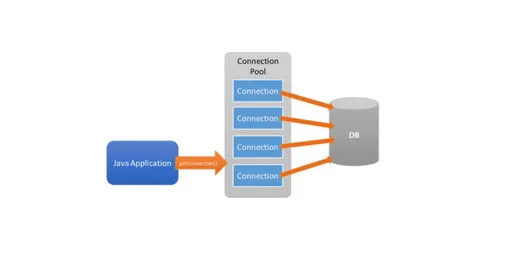
[총대마켓 팀]
java.sql.SQLTransientConnectionException
→ 8
3. 테스트 시나리오 작성
(1) 사용자 행동 정의
•
사용자가 주로 사용하는 기능을 기반으로 행동 패턴 정의
◦
각 행동에 정확한 경로(URL)와 HTTP 메서드 설정
•
ex. 로그인 → 공구 검색 → 공구 상세 보기 → 공구 참여 → 로그아웃
[총대마켓 팀]
•
시나리오 0: 공구 목록 조회(최신순)
•
시나리오 1: 공구 참여
•
시나리오 2: 댓글 조회
•
시나리오 3: 댓글 작성
이후
(2) 부하 모델 설정
•
피크 부하 테스트 : 짧은 시간에 갑작스레 부하 주어 서버가 급격한 트래픽 증가에 어떻게 반응하는지 확인
•
지속 부하 테스트 : 일정한 부하를 오랜 시간 유지해 메모리 누수 같은 장기적 문제 확인
[총대마켓 팀]
피크 부하 테스트
(3) nGrinder 스크립트 작성
•
Groovy 기반 스크립트
ex
[총대마켓 팀]
GET /read-only/offerings : 공모 첫페이지 조회
import static net.grinder.script.Grinder.grinder
import static org.junit.Assert.*
import static org.hamcrest.Matchers.*
import net.grinder.script.GTest
import net.grinder.script.Grinder
import net.grinder.scriptengine.groovy.junit.GrinderRunner
import net.grinder.scriptengine.groovy.junit.annotation.BeforeProcess
import net.grinder.scriptengine.groovy.junit.annotation.BeforeThread
// import static net.grinder.util.GrinderUtils.* // You can use this if you're using nGrinder after 3.2.3
import org.junit.Before
import org.junit.BeforeClass
import org.junit.Test
import org.junit.runner.RunWith
import org.ngrinder.http.HTTPRequest
import org.ngrinder.http.HTTPRequestControl
import org.ngrinder.http.HTTPResponse
import org.ngrinder.http.cookie.Cookie
import org.ngrinder.http.cookie.CookieManager
/**
* A simple example using the HTTP plugin that shows the retrieval of a single page via HTTP.
*
* This script is automatically generated by ngrinder.
*
* @author admin
*/
@RunWith(GrinderRunner)
class TestRunner {
public static GTest test
public static HTTPRequest request
public static Map<String, String> headers = [:]
public static Map<String, Object> params = [:]
public static List<Cookie> cookies = []
@BeforeProcess
public static void beforeProcess() {
HTTPRequestControl.setConnectionTimeout(300000)
test = new GTest(1, "43.203.234.171")
request = new HTTPRequest()
grinder.logger.info("before process.")
}
@BeforeThread
public void beforeThread() {
test.record(this, "test")
grinder.statistics.delayReports = true
grinder.logger.info("before thread.")
}
@Before
public void before() {
request.setHeaders(headers)
CookieManager.addCookies(cookies)
grinder.logger.info("before. init headers and cookies")
}
@Test
public void test() {
HTTPResponse response = request.GET("http://43.203.234.171/read-only/offerings", params)
if (response.statusCode == 301 || response.statusCode == 302) {
grinder.logger.warn("Warning. The response may not be correct. The response code was {}.", response.statusCode)
} else {
assertThat(response.statusCode, is(200))
}
}
}
Groovy
복사
POST /read-only/offerings : 공모 작성
import static net.grinder.script.Grinder.grinder
import static org.junit.Assert.*
import static org.hamcrest.Matchers.*
import net.grinder.script.GTest
import net.grinder.script.Grinder
import net.grinder.scriptengine.groovy.junit.GrinderRunner
import net.grinder.scriptengine.groovy.junit.annotation.BeforeProcess
import net.grinder.scriptengine.groovy.junit.annotation.BeforeThread
// import static net.grinder.util.GrinderUtils.* // You can use this if you're using nGrinder after 3.2.3
import org.junit.Before
import org.junit.BeforeClass
import org.junit.Test
import org.junit.runner.RunWith
import org.ngrinder.http.HTTPRequest
import org.ngrinder.http.HTTPRequestControl
import org.ngrinder.http.HTTPResponse
import org.ngrinder.http.cookie.Cookie
import org.ngrinder.http.cookie.CookieManager
/**
* A simple example using the HTTP plugin that shows the retrieval of a single page via HTTP.
*
* This script is automatically generated by ngrinder.
*
* @author admin
*/
@RunWith(GrinderRunner)
class TestRunner {
public static GTest test
public static HTTPRequest request
public static Map<String, String> headers = [:]
public static String body = "{\n \"title\": \"공모 제목\",\n \"productUrl\": \"www.naver.com\",\n \"thumbnailUrl\": \"www.naver.com/favicon.ico\",\n \"totalCount\": 5,\n \"totalPrice\": 10000,\n \"originPrice\": null,\n \"meetingAddress\": \"서울특별시 광진구 구의강변로 3길 11\",\n \"meetingAddressDetail\": \"상세주소아파트\",\n \"meetingAddressDong\": \"구의동\",\n \"meetingDate\": \"2025-04-08T02:00:00\",\n \"description\": \"내용입니다.\"\n}"
public static List<Cookie> cookies = []
@BeforeProcess
public static void beforeProcess() {
HTTPRequestControl.setConnectionTimeout(300000)
test = new GTest(1, "43.203.234.171")
request = new HTTPRequest()
// Set header data
headers.put("Content-Type", "application/json")
headers.put("Cookie","access_token=accesstokenHere")
grinder.logger.info("before process.")
}
@BeforeThread
public void beforeThread() {
test.record(this, "test")
grinder.statistics.delayReports = true
grinder.logger.info("before thread.")
}
@Before
public void before() {
request.setHeaders(headers)
grinder.logger.info("before. init headers and cookies")
}
@Test
public void test() {
HTTPResponse response = request.POST("http://43.203.234.171/offerings", body.getBytes())
if (response.statusCode == 301 || response.statusCode == 302) {
grinder.logger.warn("Warning. The response may not be correct. The response code was {}.", response.statusCode)
} else {
assertThat(response.statusCode, is(201))
}
}
}
Groovy
복사
4. 성능 메트릭 정의
•
부하 테스트 결과 평가 시 사용할 성능 메트릭 정의
◦
응답 시간(Response Time): 각 요청이 완료되기까지 걸리는 시간.
◦
TPS(Transaction per Second): 초당 처리되는 트랜잭션 수.
◦
에러율(Error Rate): 요청 중 에러가 발생하는 비율.
◦
CPU 및 메모리 사용률: 서버 자원의 사용량.
◦
DB 커넥션 풀 사용률: HikariCP 등의 커넥션 풀 사용 상태.
[총대마켓 팀]
5. 부하 시나리오 실행 및 결과 분석
•
ex. 응답 시간 길어지거나 에러율 높아짐 → CPU 과부하, 메모리 부족, 커넥션 풀 부족 의심 가능
[총대마켓 팀]
6. 최적화 및 재실행
•
부하 테스트에서 발견된 문제에 대한 최적화 작업 수행 후, 다시 부하 테스트 실행해 개선된 성능 확인
•
ex. 로그인 후 제품 검색 테스트
◦
1000명의 사용자가 동시에 로그인해 제품 검색하고 로그아웃 하는 시나리오
◦
목표: 초당 500 TPS 처리하며, 응답 시간 2초 이하로 유지
[총대마켓 팀]